
Download IconsExtract – extract icons, icon extractor, icon utility, free icon tool, Windows utility
Overview
IconsExtract is a lightweight utility designed to assist Windows users in extracting icons from executable files and application directories. The app addresses the common need to retrieve graphical assets from software installations, whether for personal customization, design projects, or system optimization. Its primary purpose is to simplify the process of locating and saving icons embedded within .exe, .dll, and other binary files, which are often inaccessible through standard file browsers. This makes it a valuable tool for designers, developers, and advanced users who require quick access to visual elements without relying on external sources.
Target users include graphic designers seeking icon assets for reuse, software developers testing UI consistency, and power users who wish to customize their desktop or application menus. Although the developer, Joe C. Jones, is listed, no further background on the individual or organization is provided. The app has been available since 2012, indicating a long-standing presence in the Windows utility ecosystem. Despite its age, its continued relevance suggests it meets a persistent need for reliable icon extraction without requiring complex tools.
Real-world use cases include building icon packs, restoring missing desktop icons, or preparing visual assets for documentation. The app's minimal footprint and free pricing model enhance its accessibility, making it a practical choice for users who prioritize functionality over modern interfaces. Its niche role in the broader software landscape underscores its value as a specialized, no-frills utility.
Key Features & Functionality
- Easy Icon Extraction: Users can select a single file or an entire folder, and IconsExtract will scan the chosen location for embedded icons. The process is initiated with a single click, making it accessible even to non-technical users.
- Support for Executable Files: Unlike many basic tools, IconsExtract can directly read and extract icons from .exe and .dll files, which often contain multiple icon representations for different display resolutions and color depths.
- Subdirectory Search: The app includes an option to recursively scan nested folders, ensuring that icons hidden deep within application structures are not missed during the search.
- Customizable Filters: Users can filter results based on icon size (e.g., 16x16, 32x32) and color depth (e.g., 16-color, 24-bit), enabling precise selection of icons that match specific design requirements.
- Free to Use: The application is distributed at no cost, allowing users to extract icons without licensing fees or subscription models.
For example, a designer working on a custom theme could use IconsExtract to gather icons from installed software, then convert them into a standardized format for reuse. A developer debugging a UI might extract icons from a legacy .exe to verify visual consistency. These practical applications highlight the app’s utility beyond simple file browsing.
Interface, UX & Performance
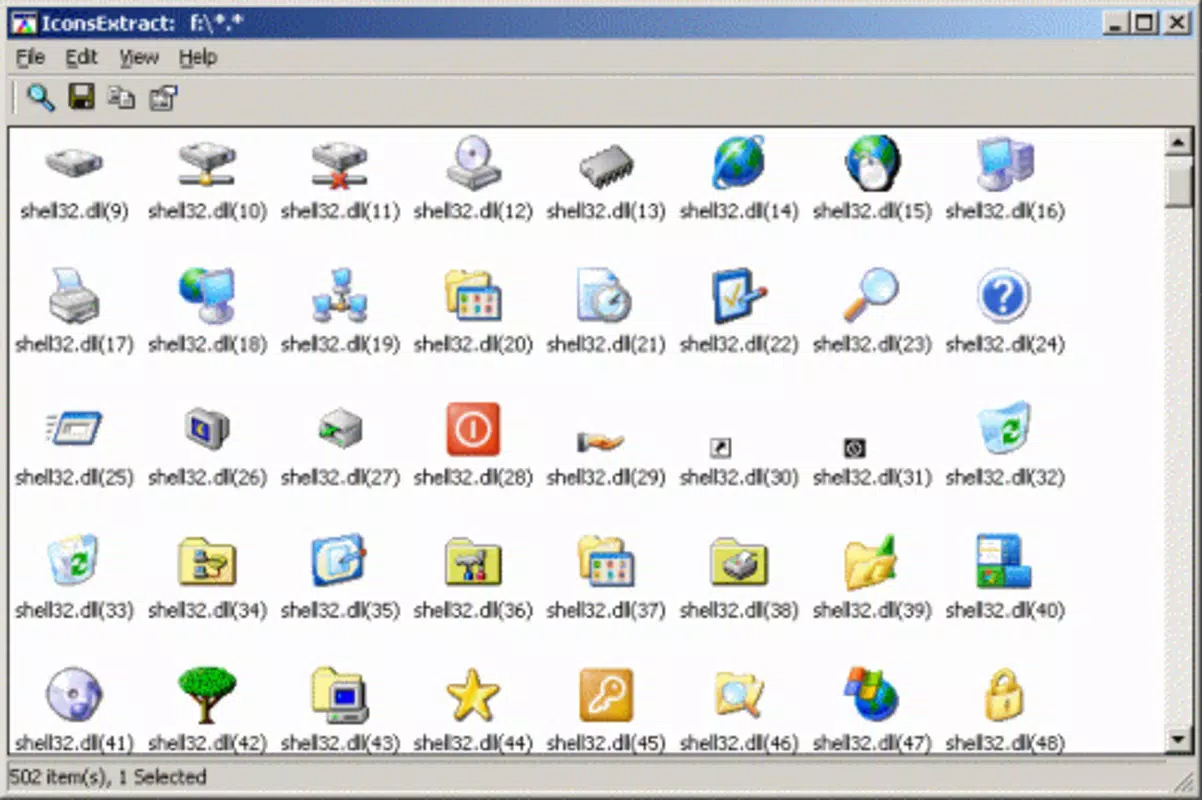
IconsExtract features a minimalistic, no-frills interface that prioritizes functionality over visual polish. The layout consists of a file selection dialog, a progress bar, and a results panel displaying extracted icons. Navigation is straightforward: users choose a file or folder, set filters, and initiate the scan. The interface is text-based with basic controls, which may feel outdated to users accustomed to modern design standards.
Although the developer did not list formal performance metrics, the app’s small size of 1.2 MB suggests efficient resource usage. It is likely to run smoothly on older Windows systems, including those with limited RAM or processing power. Responsiveness appears adequate for typical extraction tasks, though no benchmark data is available. Stability is implied by its long-term availability, though users should exercise caution when handling system files.
Performance may vary depending on the number of files scanned and the depth of subdirectory traversal. On large directories, the process could take several minutes. However, the absence of background processes or memory leaks indicates a stable operation. Overall, the UX is functional but not optimized for modern expectations.
Platform Compatibility & Technical Requirements
IconsExtract is designed for the Windows operating system. The app’s version is listed as 1.0.0, and its file size is 1.2 MB, indicating a lightweight footprint. The developer did not specify minimum OS requirements, so compatibility with modern Windows versions (e.g., Windows 10 or 11) cannot be confirmed. However, its release date in 2012 suggests it may have been developed for earlier Windows editions.
Users should verify compatibility with their current system before installation. While the app may function on newer systems through compatibility modes, no official support or updates have been reported. The lack of information about required hardware or software dependencies limits clarity on system readiness. The absence of a dedicated installer or digital signature raises potential concerns about security, though the app is free and widely used.
Pros and Cons
Pros
- Free to use with no licensing restrictions
- Efficient icon extraction from .exe and .dll files
- Supports recursive subdirectory scanning
- Customizable filters for size and color depth
- Lightweight and fast to load
Cons
- Outdated interface with no modern design elements
- Developer did not provide OS compatibility details
- No official updates since 2012
- May not function reliably on newer Windows versions
- Security verification (e.g., digital signature) not confirmed
FAQ
Is IconsExtract safe to download and install?
While the app is free and widely used, the developer did not provide a digital signature or official verification. Users should download from trusted sources and scan the file with antivirus software before installation.
Can I extract icons from any executable file?
IconsExtract can extract icons from .exe and .dll files that contain embedded icon resources. Not all executables include such resources, so results may vary.
Does IconsExtract support Windows 10 or 11?
The developer did not specify compatibility with modern Windows versions. While the app may run via compatibility mode, there is no guarantee of full functionality.
Is there a mobile version of IconsExtract?
IconsExtract is a Windows-only utility. There is no mobile version available for Android or iOS.
How do I update IconsExtract?
As of the current information, no updates have been released since 2012. Users are advised to use the latest available version from trusted sources.
Final Thoughts
IconsExtract remains a functional tool for users who need to extract icons from Windows executables without the overhead of complex software. Its simplicity, free access, and ability to scan nested directories make it a reliable choice for niche tasks. While the interface lacks modern polish and compatibility with newer systems is uncertain, the app continues to serve its core purpose effectively.
It is best suited for experienced users, designers, and developers who value utility over aesthetics. For those seeking a lightweight, no-cost solution to retrieve embedded icons, IconsExtract offers a proven, if dated, alternative. Despite its age, it still holds value in the right context.
Download IconsExtract now


